Blaze Trail Navigator
Reviews
Blaze Trail Navigator targets players who enjoy skill-based obstacle courses and incremental mastery. Its strengths are a clear difficulty curve, responsive keyboard controls, and audio-visual feedback that helps players learn from each attempt. The game does not penalize failure harshly, so repeated runs feel productive rather than punishing. The main limitation is that the experience depends on repetition and precision, which may not appeal to players seeking variety or narrative. Those who like refining timing and route efficiency will find a well-structured challenge.
Description
Course Design and Player Intent
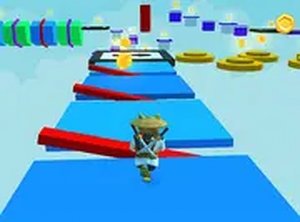
Blaze Trail Navigator is built around a series of obstacle courses that grow more complex as players advance. Early maps introduce basic gaps and low walls, giving players room to learn movement and jump timing. Later courses combine narrow ledges with tighter spacing, so a run depends on chaining precise actions without pausing. The layout of each map encourages players to study the path before attempting a run, because blind speed often leads to mistakes. That design choice rewards patience and careful observation, and it turns each completed course into a clear achievement.
Controls and Input Precision
Players control their character using standard keyboard inputs, typically arrow keys or WASD for movement and jumping. The spacebar may enable higher jumps or special maneuvers, adding an extra layer of timing to certain obstacles. The controls are responsive, meaning every input directly translates to on-screen action. That responsiveness matters because even a slight delay in a jump can send a character off a ledge. Mastering the control scheme involves learning the exact moment to press each key, which varies slightly depending on the character's speed and the obstacle's position.
Progression and Difficulty
The difficulty curve is structured to build player skill gradually. Initial maps serve as tutorials, letting newcomers get comfortable with the controls and basic obstacle types. As players advance, new elements such as moving platforms or timed gates appear, requiring faster reactions and better planning. The difficulty does not spike abruptly; each new challenge builds on previously learned skills. This steady progression keeps the game accessible to beginners while still offering tough challenges for experienced players. Completing a difficult map often requires multiple attempts, but the sense of progress is clear with each try.
Visual and Audio Feedback
The visual style is clean and functional, with a focus on clarity over elaborate decoration. Obstacles are clearly distinguishable from safe platforms, and the character's movements are smooth and easy to follow. Background environments change as players progress through different map sets, providing visual variety without distracting from the gameplay. Sound effects provide helpful feedback, such as a distinct tone for successful jumps or a different sound when falling. This audio feedback helps players quickly understand the result of their actions, reinforcing learning during practice.
Practice and Mastery
Repeating maps is a core part of improving in Blaze Trail Navigator. Each attempt allows players to refine their timing and discover more efficient routes through a course. The game does not penalize failure harshly, encouraging players to try again immediately after a mistake. Over time, players develop muscle memory for the trickier sections, turning what once seemed impossible into a routine maneuver. This focus on practice and gradual improvement makes the game rewarding for those who enjoy mastering a skill through repetition and focus.
Compatibility
Faq
What type of game is Blaze Trail Navigator?
Do I need fast reflexes to play Blaze Trail Navigator?
Does Blaze Trail Navigator have a tutorial?
What keyboard controls does Blaze Trail Navigator use?
Is Blaze Trail Navigator difficult for beginners?
What happens when you fail a course in Blaze Trail Navigator?
Games You Might Enjoy

Melody Match

Choco Benno 2: Candy Platformer

Beat Striker 3D

Precision Arcade Slicer

Bouncy Hoops Arcade Challenge

Pizza Grab Arcade Game

Pixel Path Platformer
Cosmic Crystal Quest: A Family Space Adventure

Larry World Classic Platformer

Precision Aim: Target Practice Game
Mario Action Deluxe Adventure

Editorial Notes